

🛡️ OTA Compliance — Collecting Guest Information Responsibly
What is OTA?
An OTA (Online Travel Agency) is any booking platform that sits between you and your guest — Airbnb, VRBO, Booking.com, and similar services. When guests book through these platforms, the OTA sets rules about how hosts can communicate with them through their channels.
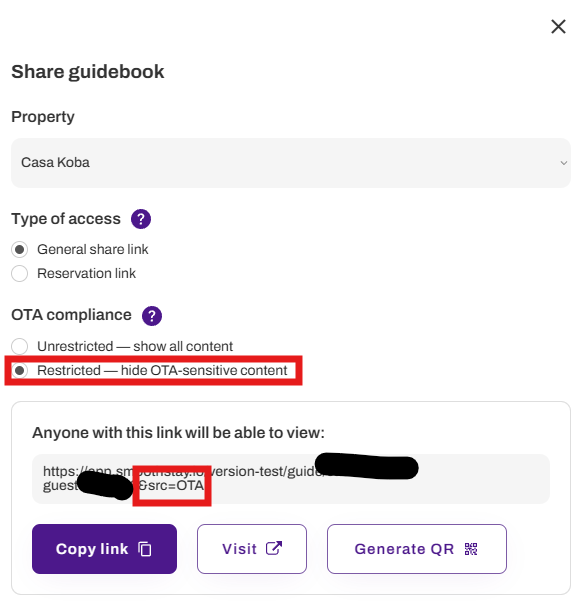
What is an OTA-restricted link? 🔗
An OTA-restricted link is any guidebook link where SmoothStay automatically hides marketing-sensitive content. There are two ways a link becomes OTA-restricted:
General or public share links — when you manually set OTA compliance to Restricted when generating the link. This adds a
?src=otaparameter that tells SmoothStay to apply restrictions when guests open the guide.Reservation links — when the booking source matches one of your configured OTA compliance sources (e.g. Airbnb, VRBO, Booking.com). Restrictions are applied automatically — no extra steps needed.
On an OTA-restricted link, the following are hidden or disabled automatically:
Articles marked as Hide from OTA guests or Mark as sponsored
Widgets that collect guest information, such as registration forms with marketing opt-in
Why does this matter for your guidebook? ⚠️
Many OTAs like Airbnb, VRBO, and Booking.com prohibit hosts from:
Collecting guest contact details for marketing
Promoting direct bookings or encouraging guests to book outside the platform
Requesting reviews on external platforms (Google, Trustpilot, etc.)
Sharing a guidebook that includes these features through an OTA channel may violate their terms of service and put your hosting account at risk.
SmoothStay gives you the tools to help you stay compliant — but following each platform's policies is ultimately your responsibility as the host.
How SmoothStay helps 🔧
OTA compliance in SmoothStay works at three levels: your share links, your individual articles, and the widgets you add to your guidebook.
Share links
When generating a general or public share link, set OTA compliance to Restricted. This automatically adds a ?src=ota parameter to your link, telling SmoothStay to hide OTA-sensitive content when guests open the guide.
For reservation links, restrictions are applied automatically based on the booking source. You control which sources trigger restrictions under Settings → Reservations → OTA Compliance Sources. All major OTAs are included by default — only direct bookings are excluded.
Articles ✍️
Inside any article's Visibility settings you'll find a Marketing settings section with two options:
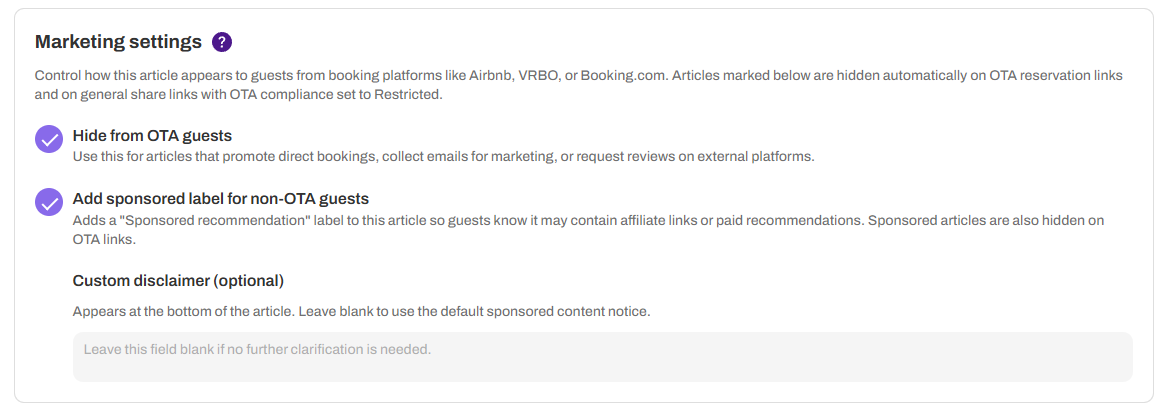
Hide from OTA guests — marks this article as OTA-restricted. It will be hidden automatically on OTA reservation links and on general share links set to Restricted. Use this for articles that promote direct bookings, collect emails, or request external reviews.
Add sponsored label — adds a "Sponsored" label and also hides the article on OTA-restricted links, since sponsored content typically involves affiliate relationships that OTAs restrict.
Widgets 📋
Widgets that collect guest information — such as registration forms — are automatically hidden or disabled on OTA-restricted links. This includes the marketing opt-in checkbox, which guests arriving via an OTA-restricted link will never see, regardless of your widget settings.
Setting up OTA compliance sources
Go to Settings → Reservations → OTA Compliance Sources to choose which booking sources trigger restrictions on reservation links.
All major platforms are enabled by default — Airbnb, Agoda, Booking.com, Despegar, Google, Hotels.com, HomeToGo, Tripadvisor, Trip.com, VRBO, and Other OTA. Direct booking is excluded by default since OTA restrictions don't usually apply to guests who booked directly with you.
You can update these sources at any time.
Quick reference examples 📌
Scenario | What we suggest |
|---|---|
Sharing via Airbnb message | General share link → set to Restricted |
Sharing with a direct booking guest | General share link → set to Unrestricted |
Sending via PMS or reservation links | Reservation link — restrictions apply according to your OTA compliance sources |
Article promoting direct bookings | Mark as "Hide from OTA guests" |
Post-stay review request article | Mark as "Hide from OTA guests" |
Sponsored local recommendation | Mark as "Mark as sponsored" |
A note on responsibility 📝
SmoothStay's compliance tools are designed to make it easier for you to do the right thing — but they don't guarantee compliance. OTA policies change, and enforcement varies by platform and region. We recommend reviewing the guest communication policies of any platform you use, and reaching out to their support if you're unsure whether specific content is permitted.