

Webhooks: send SmoothStay data to your other tools
A webhook sends information from SmoothStay to another tool automatically, the moment something changes. When a contact or reservation is created, updated, or deleted, SmoothStay sends the full record to wherever you choose.
Most hosts connect an automation tool such as Zapier, Make, or Activepieces. You can also send to your own application if you have one.
What you can do with them
If you've ever copied guest details from SmoothStay into another tool by hand, webhooks are how you stop. No coding required: you connect an automation tool once, and it runs in the background from then on.
A few things hosts set up:
Grow your email list automatically. When a guest registers and opts in to marketing, add them straight to Mailchimp, ConvertKit, or whichever tool you use. Your direct-booking list builds itself.
Keep a running spreadsheet of every booking. New reservations append to a Google Sheet, so you have your own copy for bookkeeping, your accountant, or your own reporting.
Get a message when a booking lands. Push new reservations to Slack, WhatsApp, or a text message, so you know without opening the dashboard.
Text the guest their door code at check-in. The reservation payload carries the access details, so your automation can send them at the right moment without you looking anything up.
Tell your cleaner about a new stay. Send check-in and check-out dates to whatever your team already uses, whether that's a shared calendar, Trello, or a WhatsApp group.
Keep your own CRM in sync. If you run HubSpot, Airtable, or a system of your own, contacts and reservations flow in as they're created.
You build these workflows in your automation tool (Zapier, Make, etc). SmoothStay's job is to send the information the moment it changes, and what happens next is yours to decide. The events available today cover contacts and reservations, and more will follow as the platform grows.
Before you start
Your endpoint must accept POST requests and be served over HTTPS.
Have the endpoint URL ready. In most automation tools this is the catch hook or webhook trigger URL.
Setting up webhooks
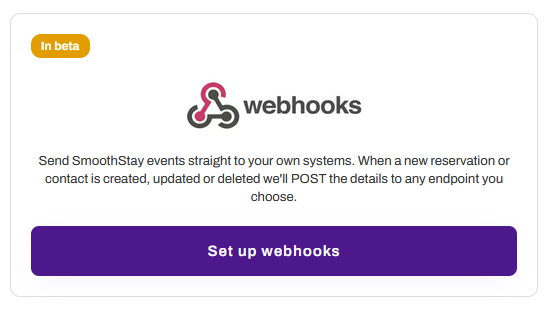
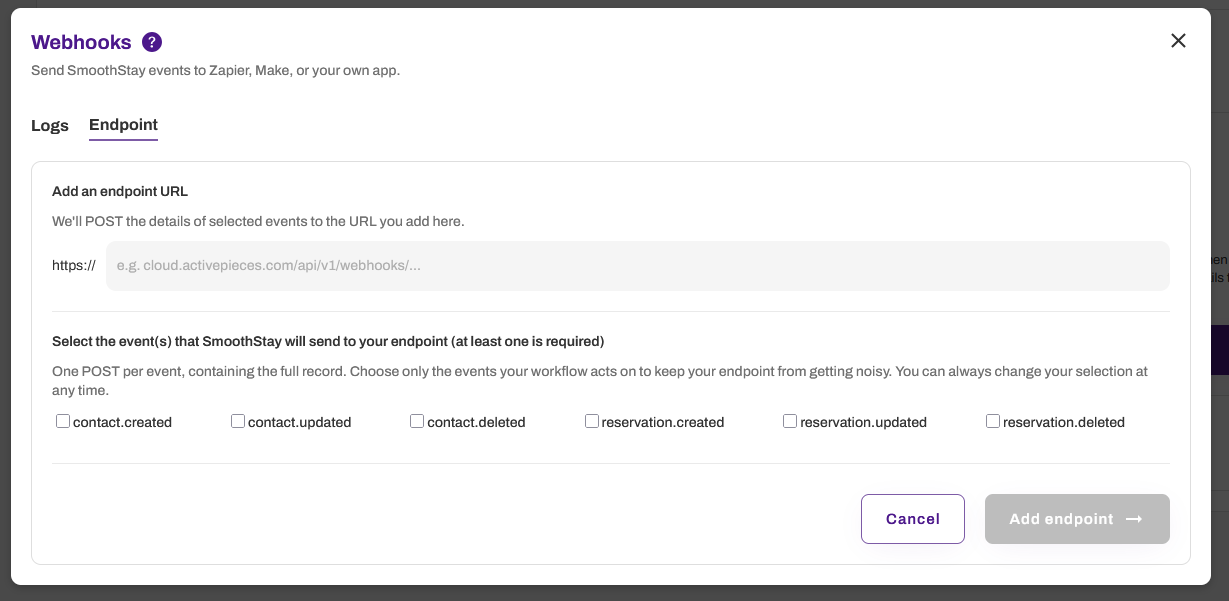
Go to Settings → Integrations → Set up webhooks.
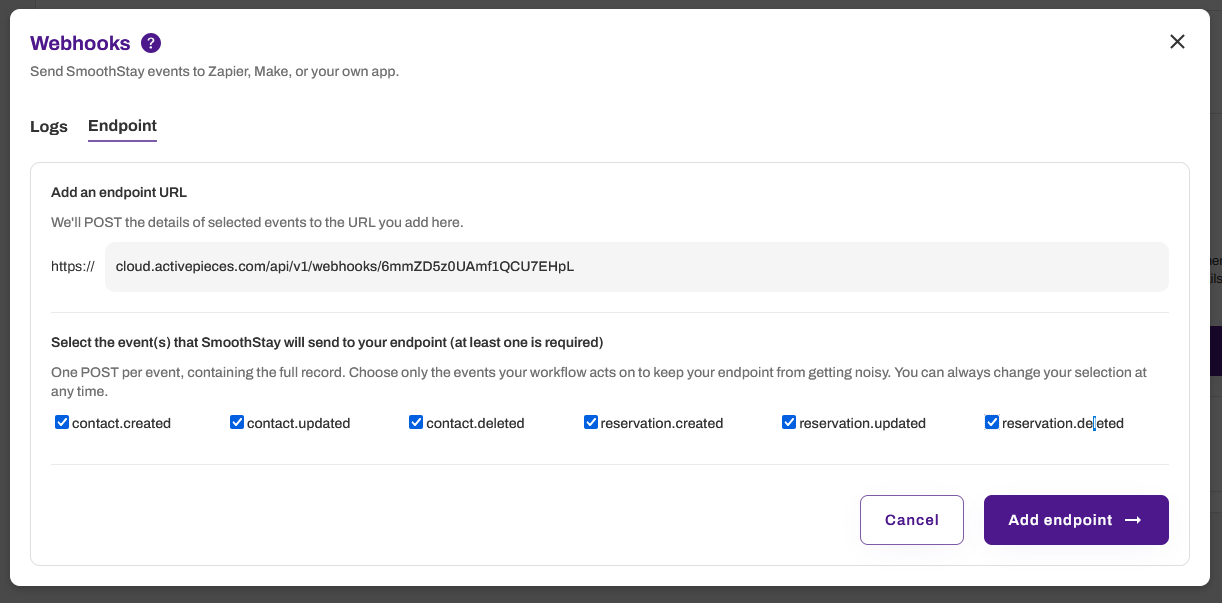
Add your endpoint URL, leaving off the
https://prefix. We add it for you, so paste only the address itself, for examplecloud.activepieces.com/api/v1/webhooks/abc123. Only secure HTTPS endpoints are supported.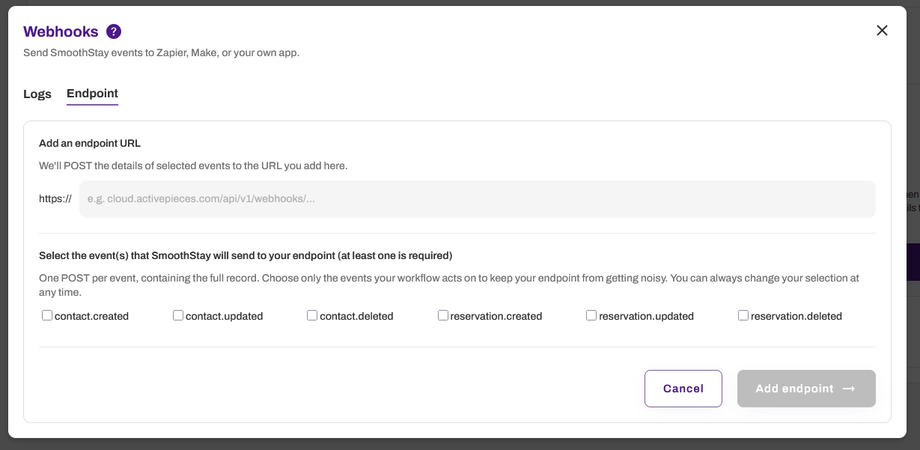
Select the events SmoothStay will send to your endpoint. At least one is required. Each event sends one POST containing the full record. Select only the events your workflow acts on, so your endpoint doesn't receive traffic it will ignore. You can change this selection at any time.
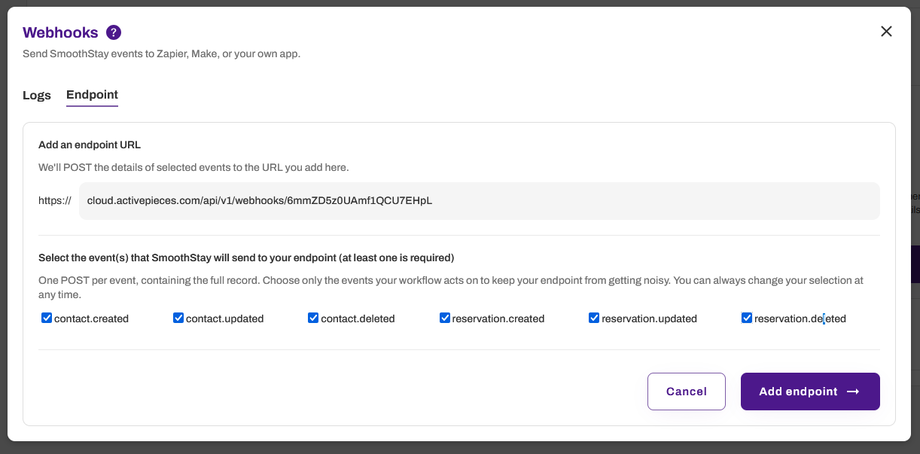
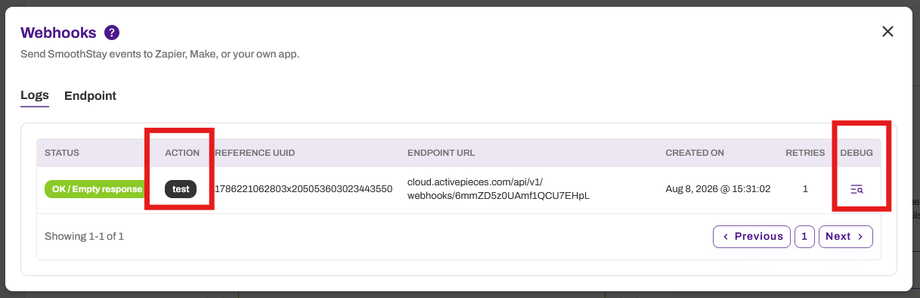
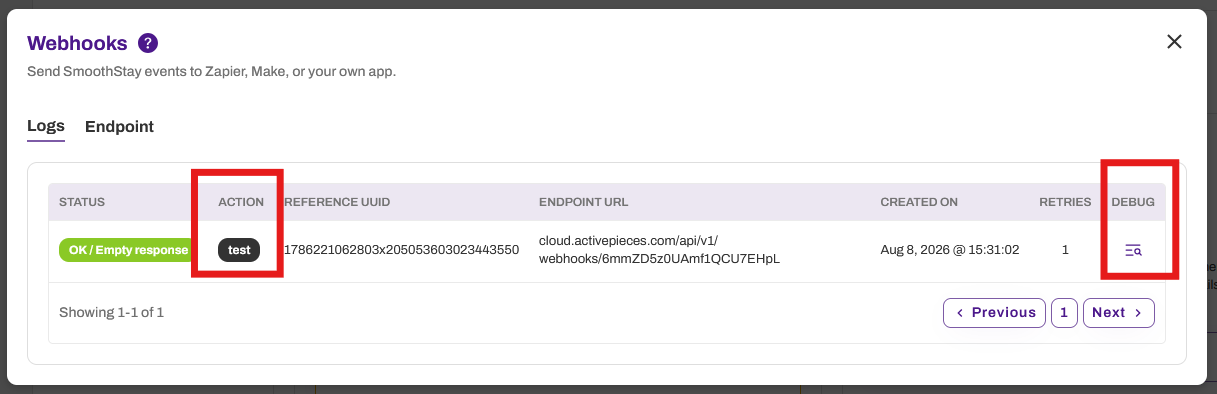
SmoothStay sends a test event to confirm your endpoint is reachable. Webhooks stay deactivated until a test event succeeds, so no live events are sent to an endpoint we can't reach. If the test fails, fix the issue at your endpoint and send another test event from the same screen. To diagnose a failure, open the Logs tab, find the delivery, and click the Debug icon. The debug view shows the status returned by your endpoint, the raw response we received, and the exact payload we sent. Compare that against the status code reference below to identify the cause.
By default, SmoothStay creates a webhook secret that is send in the X-SmoothStay-Secret header with every webhook. Compare it on your end to confirm the request really came from SmoothStay. Keep it private. We strongly recommend using it.

Rotate the secret whenever you need to. Rotation takes effect immediately. Your current secret stops working at once, and every webhook sent after that carries the new one, so verification will fail at your endpoint until you update it there. There is no overlap window. Copy the new secret and update your endpoint before continuing.
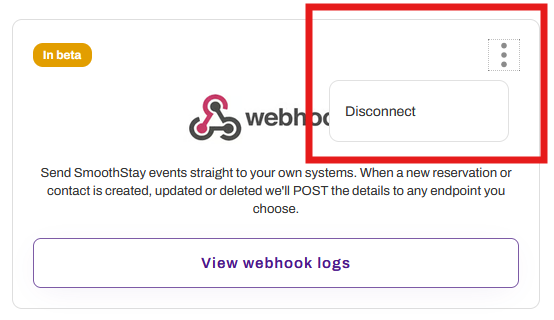
To disconnect, go to Settings → Integrations → Webhooks, click the three dots, and select Disconnect. SmoothStay stops sending events immediately. Disconnecting is permanent. Your endpoint configuration, your secret, and all delivery logs are deleted, and you'll need to set the webhook up again from scratch to resume. If you only want to pause delivery temporarily, deselect all events instead of disconnecting.

Technical reference
Everything below describes exactly what SmoothStay sends and how delivery works. If you're connecting an automation tool like Zapier or Make, you probably don't need it, since the tool handles this for you. It's here for anyone building directly against the data.
Events
Each event fires one POST containing the full record it relates to.
Event | Fires when |
|---|---|
| A contact is created, whether through a Guest Registration widget, a manual entry, or a PMS sync |
| An existing contact's details change |
| A contact is deleted |
| A reservation is created or imported |
| An existing reservation's details change |
| A reservation is deleted |
Updates can fire more often than you expect, particularly for reservations synced from a connected PMS. Build your workflow so that receiving the same record more than once is harmless.
Payload
The body is a JSON object containing the record and its related records. There is no wrapper or envelope, so read fields directly off the top level of the body rather than looking for a nested data key. The event name arrives in the X-SmoothStay-Event header, not in the body.
Four things to know about how values are represented:
Related records are nested as full objects, not IDs. A reservation payload contains the complete
unitandcontactobjects inline, so you don't need a second lookup to get the property address or the guest's phone number. Theorganizationfield is the exception and arrives as an ID string.Access links are nested under
access. A reservation carries its own reservation-scopedaccessobject, and the nestedunitcarries a separateaccessobject for the property's general share link. Both contain atokenand a fulllink.Empty fields arrive as the string
"null" or " ", not JSONnull. Treat"null"as empty when mapping fields in your automation tool.Dates are ISO 8601 strings in UTC, for example
2026-07-12T17:15:15.604Z.
Example contact.created body:
{ "uuid": "1784403540405x7499146989350725", "organization": "1728585128372x1186475767773138", "email": "guest@example.com", "first_name": "Henry", "last_name": "Dom", "phone": "447905279179", "language": "en", "location": "Bromley, United Kingdom", "method": "Imported from PMS", "integration_service": "Hospitable", "integration_service_uuid": "55805008", "marketing_opt_in": "no", "marketing_consent_date": "null", "created_date": "2026-07-18T14:39:00.000Z", "modified_date": "2026-07-18T14:39:00.000Z"}Fields may be added to payloads over time as SmoothStay grows. Adding a field is not treated as a breaking change, so your endpoint should ignore fields it doesn't recognise rather than failing on them.
Headers
Every request carries these headers:
Header | Purpose |
|---|---|
| Your endpoint's shared secret. Compare it to confirm the request came from SmoothStay |
| The event name, for example |
| A unique ID for this delivery. Use it to detect duplicates |
| When the event was generated |
Content-Type is application/json.
Delivery, retries, and deactivation
What counts as success. Any 2xx status code. An empty response with no status is also treated as success, since many endpoints acknowledge a request without returning a body. Reply as soon as you receive the request and do your processing afterwards, since a slow reply can be recorded as a timeout even when your workflow eventually succeeds.
Retries. SmoothStay attempts each delivery up to 3 times in total, including the original send.
We retry failures that may resolve on their own: timeouts, rate limits (429), and server errors (the 5xx family, including Cloudflare's 520 to 524 range).
We don't retry failures that won't, because repeating the request would produce the same result. These are a URL that no longer exists (404), a request your endpoint rejects (401, 403, 405), and a payload your endpoint won't accept (400, 413, 415, 422).
The Retries column in the Logs tab shows how many attempts a delivery took. A value of 1 means it succeeded on the first send.
Deactivation. If an endpoint keeps failing after its retries are exhausted, SmoothStay deactivates the webhook and stops sending events. We email your organization's admin to let them know, so a broken endpoint doesn't go unnoticed. To resume, fix the issue at your endpoint and send a successful test event from the Endpoint tab. Events that occurred while the webhook was deactivated are not sent retroactively.
Delivery guarantees. Delivery is at-least-once, not exactly-once, and not ordered. A retried event can arrive after a newer one, and the same event can arrive twice. Two practices make this safe:
Deduplicate on
X-SmoothStay-Delivery. Ignore a delivery ID you've already processed.Use
X-SmoothStay-Timestampto resolve ordering. When two updates to the same record arrive close together, the later timestamp is the newer state.
Security
Every webhook includes an X-SmoothStay-Secret header carrying a shared secret unique to your endpoint. Compare it against your stored secret with a plain string match and reject anything that doesn't match. Combined with HTTPS, which encrypts the request in transit, this confirms the request came from SmoothStay.
This is a shared secret rather than a computed signature, which means it's verifiable in any automation tool with a simple comparison step.
Treat the secret like any other credential:
Keep it private and store it securely.
Serve your endpoint over HTTPS so the secret isn't exposed in transit.
Rotate it if you believe it has been exposed.
What's in the payload. Reservation payloads include operational details for the stay, such as the property's wifi credentials, door access instructions, smart lock code, internal notes, and guidebook access links. This is deliberate. It's what makes automations like texting a guest their door code at check-in possible without a second lookup.
Because most automation tools store the full request body in their execution history, it's worth knowing where that data ends up:
Check what your receiving tool retains and who on your account can see it.
Drop fields your workflow doesn't use, early in the flow.
Be deliberate about forwarding raw payloads into shared destinations such as team chat channels or public spreadsheets.
Troubleshooting
Open the Logs tab and click the Debug icon on a delivery to see the status your endpoint returned, its raw response, and the exact payload we sent. Here are some common examples:
What you see | Likely cause | What to do |
|---|---|---|
| The endpoint URL is wrong, or the flow behind it was deleted | Check the URL and confirm the receiving flow still exists and is published |
| Your endpoint is rejecting the request | Check whether the receiving tool requires its own authentication |
| The endpoint doesn't accept POST | Confirm the URL is a webhook or catch hook trigger, not a page URL |
| Your endpoint is rate limiting us | Usually resolves on retry. Check your receiving tool's plan limits |
| Your endpoint or the service behind it is failing or unavailable | Usually temporary. Check whether the receiving service is up |
| The endpoint sits behind Cloudflare and the origin server is down or too slow | Check the server behind Cloudflare, not Cloudflare itself |
Empty or no status | We couldn't reach your endpoint at all, or it didn't respond in time | Check the URL is correct and reachable, that DNS resolves, and that HTTPS is valid |
No events arriving at all | Webhooks may be deactivated, or no events are selected | Check the Endpoint tab for the deactivated banner, and confirm at least one event is selected |
Duplicate records at your end | Normal. Delivery is at-least-once | Deduplicate on the |
If a delivery succeeded from our side but nothing happened in your tool, check that the receiving flow is published and enabled. Many automation tools accept requests on a draft flow without running it.
Need help?
Contact us at hello@smoothstay.io with the delivery ID from the Logs tab and we can look at it from our side.