

Property profile: basic info & amenities
Your AI Concierge answers guest questions using two sources: the articles you write, and the structured details on your property profile. This article covers the refined Basic info fields and the new Amenities section, both found under Properties/Units/Rooms → your unit → Profile.
The point of these fields is accuracy. When a guest asks something you never wrote a dedicated article about, the Concierge can still answer from this structured data instead of giving an out-of-scope response. The more complete this profile, the fewer "I'm not sure about that" replies your guests get.
Where to find it 📍
Go to Properties, open a property, and stay on the Profile tab. In the left menu you'll see Basic info, Location, Team, Tags, and Amenities.
Basic info
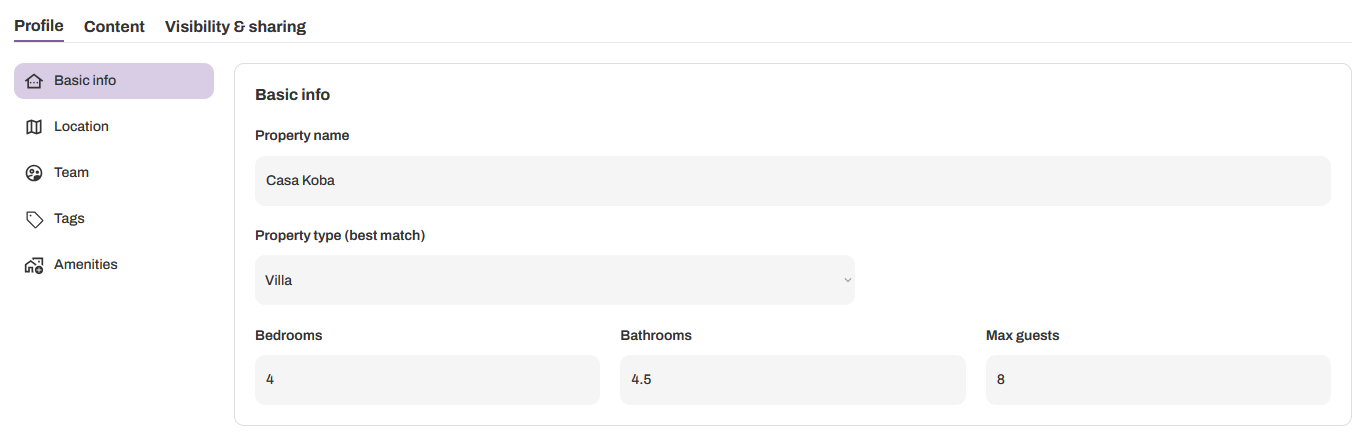
The Basic info panel now captures the specifics that define a unit:
Property name — how the property is labeled across your guidebook
Property type (best match) — for example Villa, Apartment, Cabin, Hotel room. Pick the closest match
Bedrooms/Beds
Bathrooms
Max guests
These give the Concierge the baseline facts about the unit. A guest asking "how many people can stay here?" or "is this a whole villa or a room?" gets a correct answer pulled straight from these fields, even with no article written on the subject.
Amenities ✨
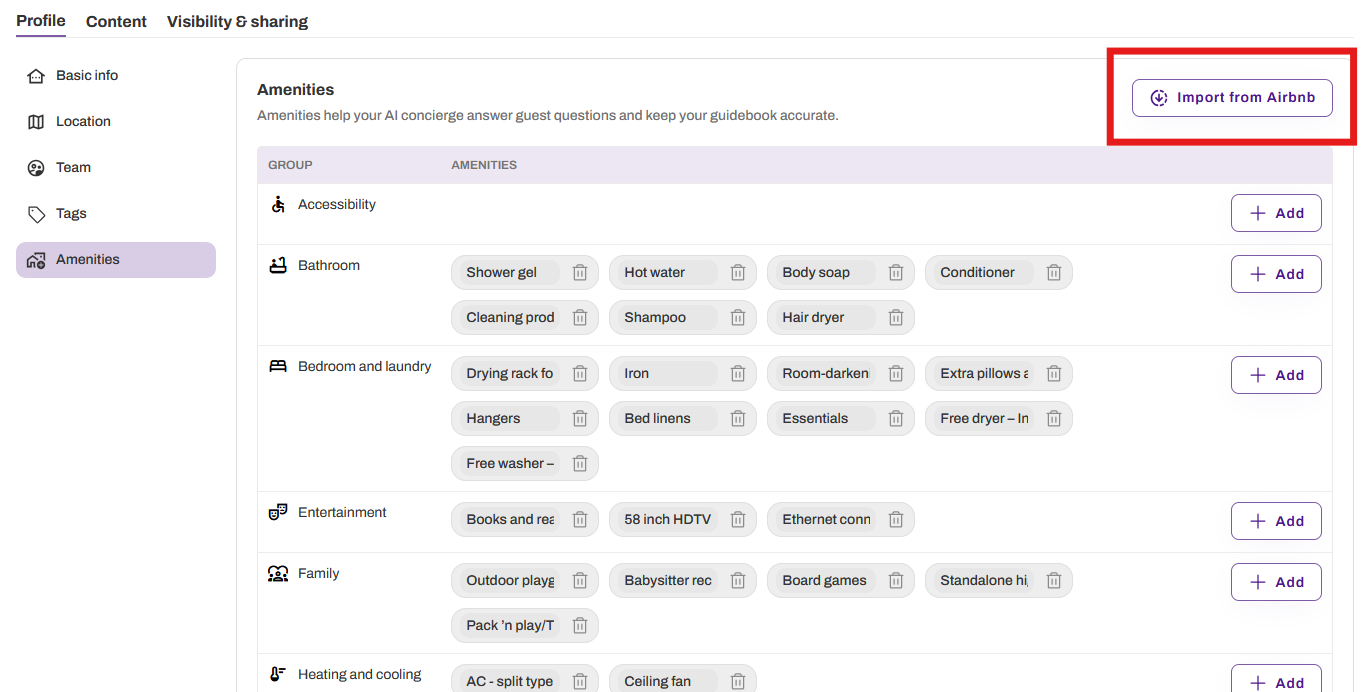
The Amenities section lists what the unit offers, organized into groups: Accessibility, Bathroom, Bedroom and laundry, Entertainment, Family, and more. Each amenity sits inside its group as a removable chip.
Import your amenities directly from your Airbnb listing or add them with the Add button next to any group. Remove them with the trash icon on the chip.
Importing from Airbnb is a one-time import, not a live sync. If you update amenities on Airbnb later, import again to refresh them.
As the panel notes, amenities help your AI Concierge answer guest questions and keep your guidebook accurate. If a guest asks "is there a hair dryer?" or "do you have a crib?", the Concierge checks this list and answers directly rather than guessing or deferring.
The AI Wizard prefills this for you 🪄
When you create a property through the AI Wizard, these fields are populated automatically from your listing. Property type, bedroom and bathroom counts, guest capacity, and the full amenities list come in pre-filled so you're starting from a complete profile, not a blank one.
Everything stays editable. Review what the Wizard brought in, correct anything that's off, add what's missing, and remove what doesn't apply. You can edit any of it at any time.
Why filling this out matters
Articles answer the questions you anticipated. Basic info and Amenities answer the ones you didn't. Together they widen the range of questions your Concierge can handle confidently and shrink the number of moments where it has to say it doesn't know. A few minutes spent completing the profile pays off in every guest conversation that follows.